
Why is the Order-Ln not Populating on a Worksheet?
What is the Order-Ln on a Worksheet?
The Order-Ln is the link between the Order line detail (aka the grade) on the Order, which is then applied to a worksheet. If you select a select a grade that is not a contract grade, then it will not be linked to any pricing or an order and will simply be spot priced on the worksheet. The Order-Ln numbers on the grade line on the order should match exactly the Order-Ln on the same grade on the worksheet. The system does its automatically, if the right conditions are met (ie matching grades, packaging types). Below are some of the common trouble shooting issues that clients may run into and how to fix them. 
Why is the Order-Ln Important?
The Order-Ln allows for accurate reporting that reflects the shipped quantity. If the Order-Ln is not present, then the system can't track the weight shipped against the Order amount.
Why is the Order-Ln not populating on a Worksheet?
- The grade and packaging type on a Sales Order and Purchase Order must match in order for both of the Order-Ln details to pull through on a worksheet.
- NOTE: the system is only looking for a match for these two criteria. The alternate name or specifications can differ.
- If one of these two do not match, cieTrade will select the grade and packaging type from whichever order is entered first (and will not pull through the Order-Ln and pricing for the other order).

- If one of these two do not match, cieTrade will select the grade and packaging type from whichever order is entered first (and will not pull through the Order-Ln and pricing for the other order).
- NOTE: the system is only looking for a match for these two criteria. The alternate name or specifications can differ.
How a Missing Order-Ln can be corrected:
- Verify that the grade and packaging types match on the Sales and Purchase Order (alter them to match correctly as needed).
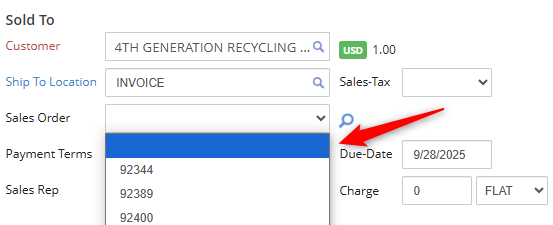
- Reset either the linked Sales or Purchase Order that did not have the correct packaging by clicking the blank box at the top of the drop down list.
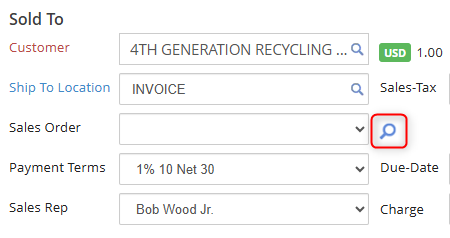
- Re-link your Sales or Purchase Order with matching packaging types using the spyglass icon.
If you have additional questions, please contact the Support Team via email to support@cietrade.net.