
The Admin Role
The Admin Role allows unrestricted access to all modules in cieTrade. We have recently changed the functionality, so users are no longer able to make changes to the Admin Role. User's will still have the ability to "Clone" the role to create a new role with restricted access to certain modules.
1. Viewing your current Admin Role Accessibility.
Navigate to Settings > Users & Roles and select the roles tab at the top of the page.

You will now notice that the Admin role has two options, View and Clone. Selecting View will allow you to see all the modules the Admin role currently has unrestricted access to. Selecting Clone will allow you to create a new role and restrict accessibility to whichever modules you would like the new role to have access to or not.

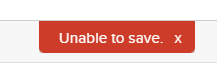
When selecting View, if you try to make edits to the Admin Role you will be unable to save the changes.
 2. Cloning the Admin Role
 2. Cloning the Admin Role
When selecting the Clone option, you will prompted to create a new role name and select the modules you would like the user to be restricted from certain actions.
NOTE: When creating your new role you will be unable to save a new role with the name "Admin".

Assign your new role to users by navigating to their user profile and selecting the role from the drop down options.

If you have additional questions, please contact the Support Team via email to support@cietrade.net.