
Shared Savings
The Shared Savings model is essentially an agreement between you and your customer that you are saving them a pre determined amount of money, and you will be taking a percentage of the savings. This model can be tracked in cieTrade using the Benchmark option on a Service Record.
Getting Started
Begin by navigating to the Counterparty location you would like to apply a shared savings percentage to. Enter the percentage into the shared savings section.
 Once you have saved your Shared Savings amount, navigate to your Service Manager to create a new service record.
Service Records
1. Create a new service record or edit an existing record.
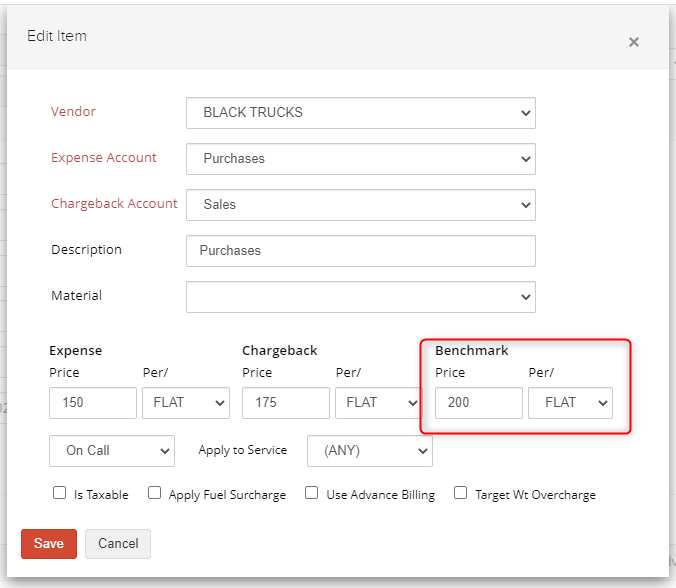
2. Add an expense and enter your shared savings fee in the Benchmark section. The chargeback and benchmark must be in the same unit of measure.
3. Create a new Billing Sheet to pull in your charges and apply your shared savings. Note: you must apply your charges prior to adding shared savings.
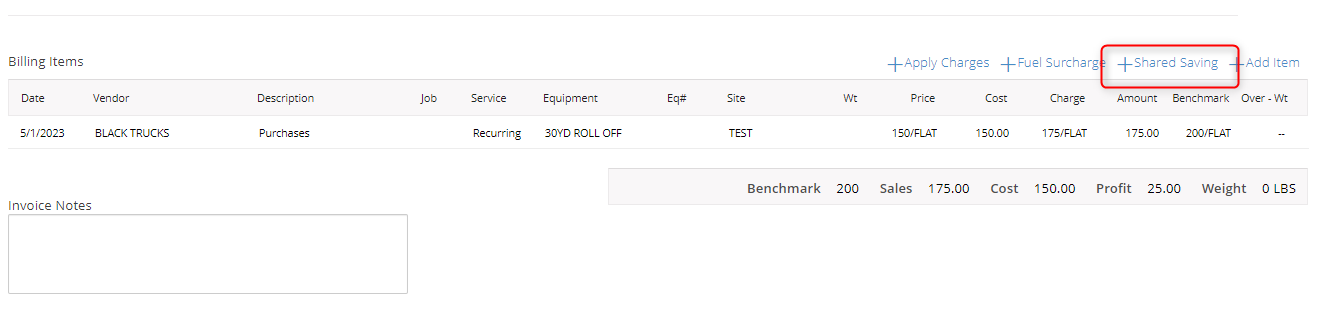
4. This will apply your Shared Savings amount to the bill sheet.

If you have additional questions, please contact the Support Team via email to support@cietrade.net.