
How to use the Multiple Loads Import Tool
cieTrade supports importing multiple receiving tickets at once. This feature can easily save you time if you are creating more than one receiving ticket at a time.
1. Begin by navigating to Inventory > Receiving.
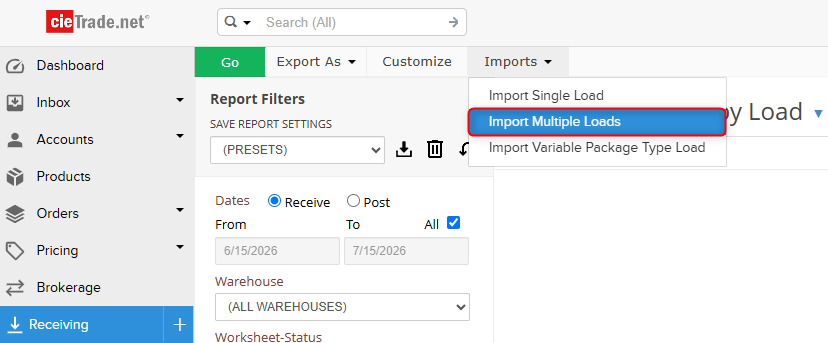
2. From the Receiving Inquiry, select Import > Import Multiple Loads.
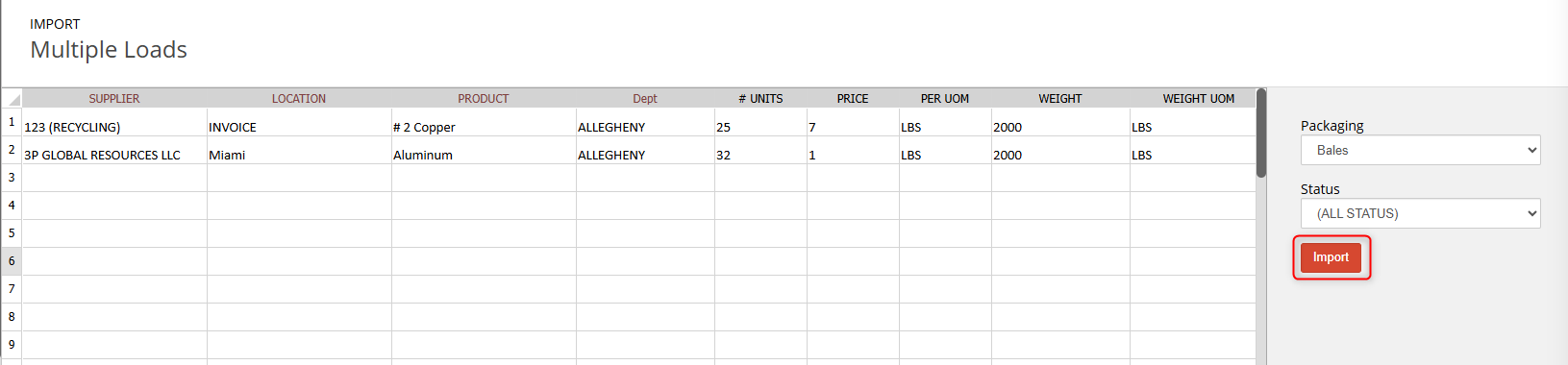
3. Once the spreadsheet is open, user's have the option to select a packaging type, and should do so first to populate any additional specification columns based on the property set of the packaging. This will import all the receiving tickets being created with the associated packaging type.
 4. You can manually fill in the corresponding data to each field, such as Supplier, Location, Price, Units, etc. Copy and pasting from an outside file is supported as well.
- Please note: one single line within this spreadsheet equates to one receiving ticket.
5. User's can elect to import the receiving tickets into either a Status of Work, Completed, Posted, and Cancelled.
6. When ready, you can import the spreadsheet by clicking 'Import'.
After the spreadsheet is uploaded, you will be shown a breakdown of the Receiving Ticket(s) you just created.
OPTIONAL: You can click on the line item(s) to view the worksheet. If needed, you can click into the worksheet and make changes.

If you have additional questions, please contact the Support Team via email to support@cietrade.net.